7.2 How to draft and send your Submission to WIDP
To send a Submission to WIDP, please follow the instructions below:
1. Navigate to the clause location for your query.
2. Once you have located the relevant page in the document, click the "?" icon as shown below:
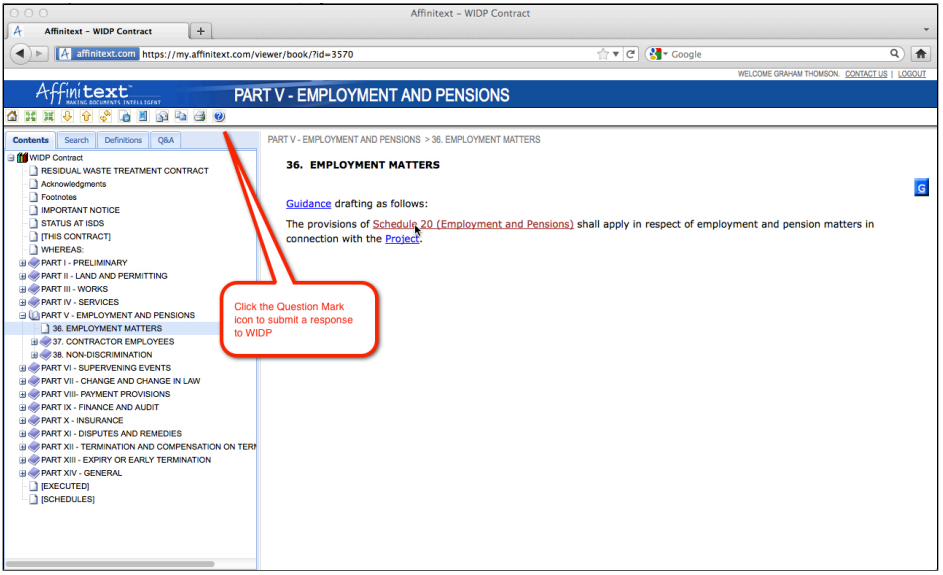
3. Clicking the "?" icon will open the Question Editor in a new window. From here you can select the type of Submission you wish to make, draft your Submission text and add any files you wish to attach to the Submission.
4. You can now either save the submission so you can come back to it later, or submit it to WIDP. To submit to WIDP your question must be "Final". Tick the "Final Question Text" box before hitting "Submit".
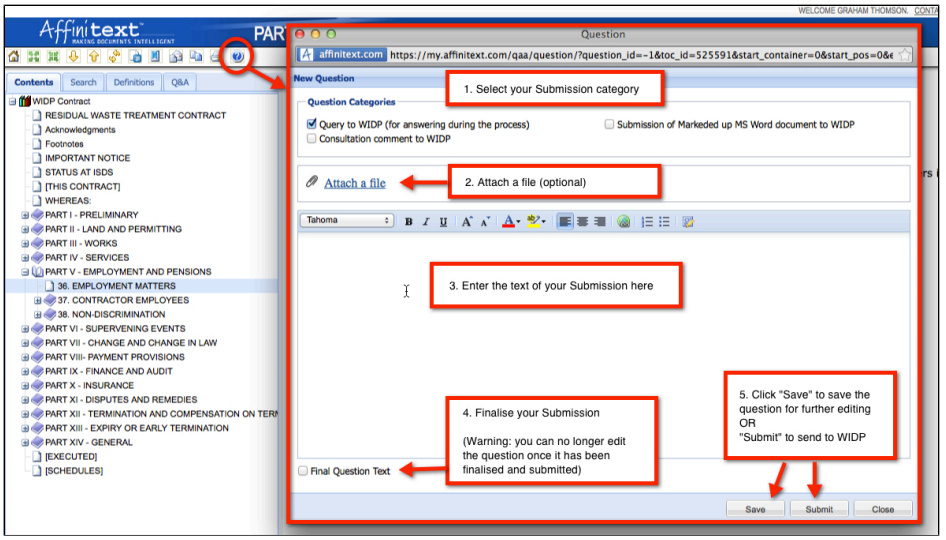
5. You can review saved questions in your Questions Report prior to submitting. Learn more about Reports in 8. Using the Questions and Answers Reports below.
|
|
Mark-up submissions https://my.affinitext.com/viewer/book/?id=3569&toc_uid=6317598 |
